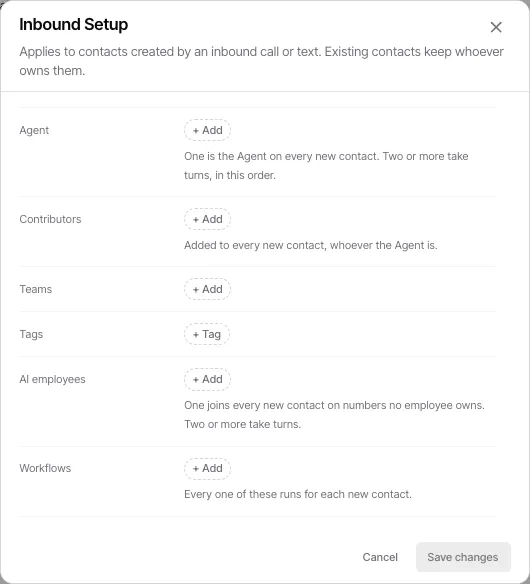
Inbound Setup
When somebody who is not yet in your database calls or texts one of your numbers, Goliath creates a contact for them. Inbound Setup is the rule that decides what happens to that new contact: which teammate owns it, who else is attached to it, which teams and tags it lands with, which AI employee joins it, and which workflows fire for it.
Two things it is not. It does not touch existing contacts — if the caller is already in your database, they keep whoever owns them, and Inbound Setup never runs. And it is not call routing: who rings when the phone rings is decided separately (see Missed-call cover below).
Inbound Setup exists at two levels:
- The org default — one setup that applies to every number that has no setup of its own, including numbers you buy later. This is what a number means when it reads “Uses org default”.
- A per-number override — one number’s own setup, which replaces the org default for that number only. A number with one reads “Custom for this number”.
That is the whole model: set it once for the organization, and override the handful of numbers that genuinely need to behave differently.
What a setup contains
Section titled “What a setup contains”| Field | What it does |
|---|---|
| Owner | Who owns each new contact. One teammate owns every contact; list two or more and they take turns, in the order shown. |
| Collaborators | Teammates added to every new contact, whoever ends up owning it. A teammate cannot be both an owner and a collaborator. |
| Teams | Teams the new contact is attached to. |
| Tags | Tags applied to every new contact on the spot. |
| AI employees | (Org default only.) Who joins a new contact on numbers no AI employee owns. One is fixed; two or more take turns. |
| Workflows | Every workflow listed here runs for each new contact. |
Step-by-Step Guide
Section titled “Step-by-Step Guide”1. Setting the org default
Section titled “1. Setting the org default”-
Open Settings → Team & Phone Numbers, then the Defaults tab
The Defaults tab holds the settings that apply to every number that has not been given its own. The first row, New contacts, is the org-wide Inbound Setup.
-
Read the current value
The row shows the owner pool and AI employees as named chips, so you can see who is actually in the rotation without opening anything. If it reads “No default set. They go to the receiving number’s owner”, no org default exists yet and new contacts fall to whoever the receiving number belongs to.
-
Click Set (or Edit)
The Inbound Setup dialog opens with one row per field from the table above.
-
Fill in the fields and save
Order matters in the Owner and AI employees rows — that is the rotation order, top to bottom. Click Save changes. The new default takes effect immediately for every number that has no setup of its own.
2. Giving one number its own setup
Section titled “2. Giving one number its own setup”-
Open the member’s Manage Phone sheet
From Settings → Team & Phone Numbers, click the team member’s row. Each number assigned to them lists its own configuration, including an Inbound line reading either “Uses org default” or “Custom for this number”.
-
Click Override
The dialog opens seeded from the org default — an override starts as the default, tweaked, rather than as a blank form. Nothing is saved yet.
-
Change what should differ, then Save changes
Save changes stays disabled until you actually change something. That is deliberate: saving an untouched form would fork the number off the org default permanently, which is a change you did not mean to make. Once saved, the row reads “Custom for this number” and that number stops following the org default entirely — including future edits to the default.
3. Putting a number back on the org default
Section titled “3. Putting a number back on the org default”-
Find the number’s Inbound row
An overridden number shows two actions instead of one: Edit and Reset.
-
Click Reset
This deletes that number’s own setup. (The same action is available inside the dialog as Revert to org default.) The row goes back to reading “Uses org default”, and the number follows the org-wide default again — including any changes made to it since.
Related settings on the Defaults tab
Section titled “Related settings on the Defaults tab”Two neighbouring rows are often confused with Inbound Setup because they also concern inbound calls. Both are admin-only.
- Missed-call cover — who picks up a call the human missed. On any line no AI employee owns, the human rings first and the cover takes what they miss (immediately, when the line has no human). One employee, org-wide. This is routing; Inbound Setup is contact ownership.
- Head start on shared lines — on a number a teammate shares with an AI employee, how long a brand-new texter belongs to the human before the AI steps in. If the human replies in time, the AI stays out of it.
Frequently Asked Questions
Section titled “Frequently Asked Questions”Q: What does “Uses org default” mean on one of my numbers?
Section titled “Q: What does “Uses org default” mean on one of my numbers?”That number has no Inbound Setup of its own, so it follows the organization-wide default from the Defaults tab. It is the normal state — most numbers should be here. Edit the default and every number reading “Uses org default” changes with it.
Q: If I change the org default, do my overridden numbers change too?
Section titled “Q: If I change the org default, do my overridden numbers change too?”No. A number reading “Custom for this number” is fully independent: it keeps its own setup and ignores the default from then on. To bring it back, use Reset.
Q: Does Inbound Setup change who owns contacts that already exist?
Section titled “Q: Does Inbound Setup change who owns contacts that already exist?”No. It only applies to contacts created by an inbound call or text. An existing contact keeps whoever owns them, no matter which number they reach you on.
Q: Do numbers I buy later follow the org default?
Section titled “Q: Do numbers I buy later follow the org default?”Yes. The org default applies to every number with no setup of its own, including numbers provisioned after you set it — you do not have to revisit it each time you add a number.
Q: Why is Save changes greyed out when I open an override?
Section titled “Q: Why is Save changes greyed out when I open an override?”Because you have not changed anything yet. An un-overridden number seeds its form from the org default, so saving it untouched would silently fork that number off the default. The button enables as soon as you make a real edit.
Q: I see “Unavailable AI employee” or “Unavailable workflow” in a setup. What is that?
Section titled “Q: I see “Unavailable AI employee” or “Unavailable workflow” in a setup. What is that?”Something saved into the setup no longer exists or is no longer offered — a deleted AI employee, or an archived workflow. It is kept in the picker as a removable row rather than hidden, because a saved-but-invisible entry would block every later save on that number. Remove the row and save.
Q: Who can edit this?
Section titled “Q: Who can edit this?”Inbound Setup itself is not admin-restricted — the New contacts row and each number’s override are editable by anyone who can reach the page. The two neighbouring rows, Missed-call cover and Head start on shared lines, are organization-admin only, because they retime who answers an inbound call.