
How Do I Download Contacts?
Before you start
Section titled “Before you start”Use filters or a list to narrow the contacts you need, then select the rows to include. Downloading contacts is available only when your organization has export access; the app also blocks a selection containing contacts created outside your organization.
Download selected contacts
Section titled “Download selected contacts”-
Select contacts and open More
In the Contacts table, select one or more rows. Open More in the selection toolbar, then choose Download file.

-
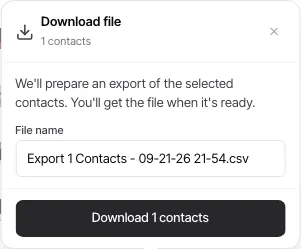
Name the export and review the selection
The prompt shows the number of selected contacts and suggests a filename. Change the filename if needed, then review the selection before continuing.
-
Start the download only when ready
Select Download n contacts to begin preparing the file. The app confirms that it is preparing the export and makes the file available when it is ready.
If Download file is unavailable
Section titled “If Download file is unavailable”- Plan access: Contact exports require a paid plan.
- Cross-organization contacts: Remove contacts created outside your organization from the selection, then try again.