
Review import results, duplicate rows, and errors
Open the upload
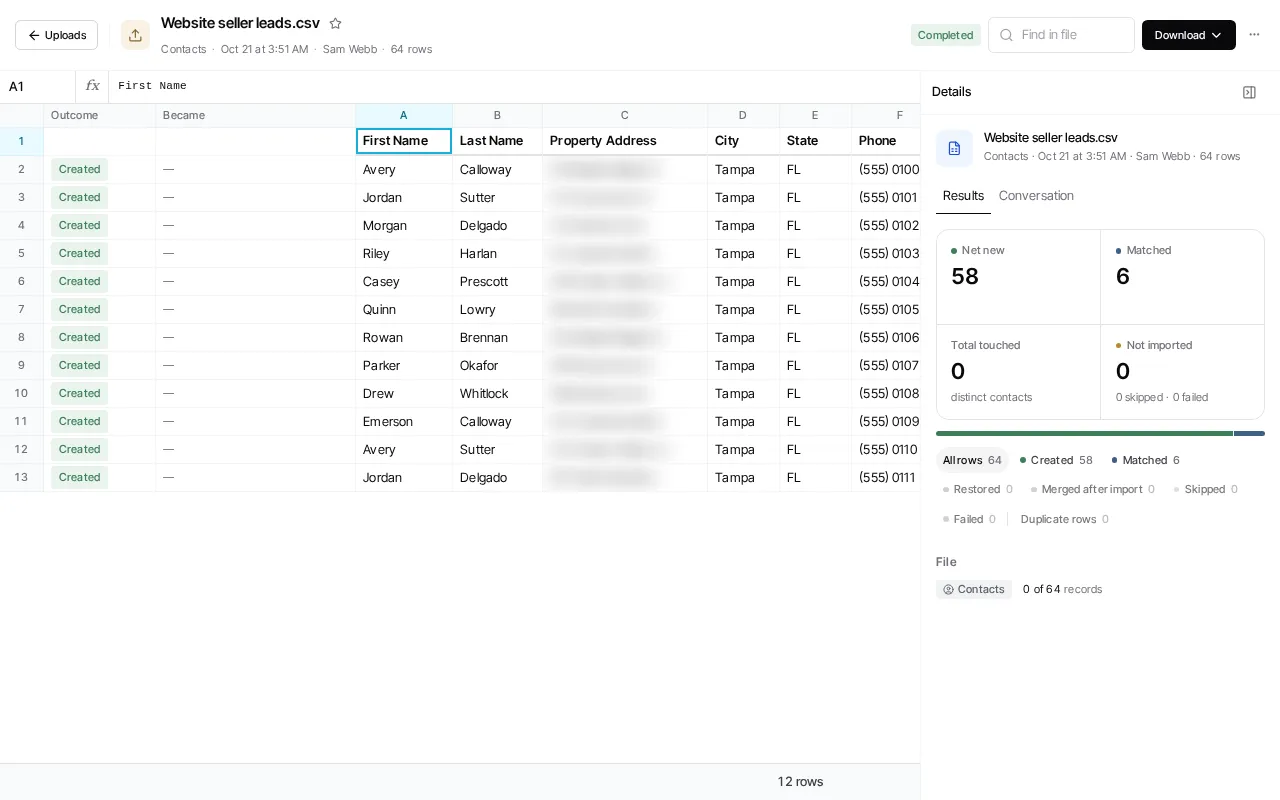
Section titled “Open the upload”Open Library → Uploads and select the upload. Its page shows the file with an Outcome column for every row, and the Results in the Details panel beside it. If the results cannot load, use Try again; the retry does not change the upload.
Read row outcomes
Section titled “Read row outcomes”For contact imports, Results counts the rows that were Net new, Matched to an existing contact, and Not imported, and groups every row into Created, Matched, Restored, Merged after import, Skipped, Failed and Duplicate rows. Select a group to show only those rows, then select a row to see its detail and reason.
An older import can lack detailed outcome tracking. In that case, the report says the detailed breakdown is unavailable; contact totals and duplicate-row information may still be present. Do not interpret an absent breakdown as a zero count.
Handle duplicate and failed rows
Section titled “Handle duplicate and failed rows”The report identifies duplicate source rows and can identify the earlier source row for the same contact. It can also report contacts merged after import. Those report outcomes describe what happened to this import; they are not a promise of a particular matching algorithm or an instruction to merge records manually.
For a failed or skipped row, inspect the row detail and correct the source data or mapping before starting another upload. Do not rerun the entire import just because a report is still loading or because one row failed.