
Direct mail
Direct mail lists the physical mail your workflows sent and where each letter is now. Open Library → Direct mail.
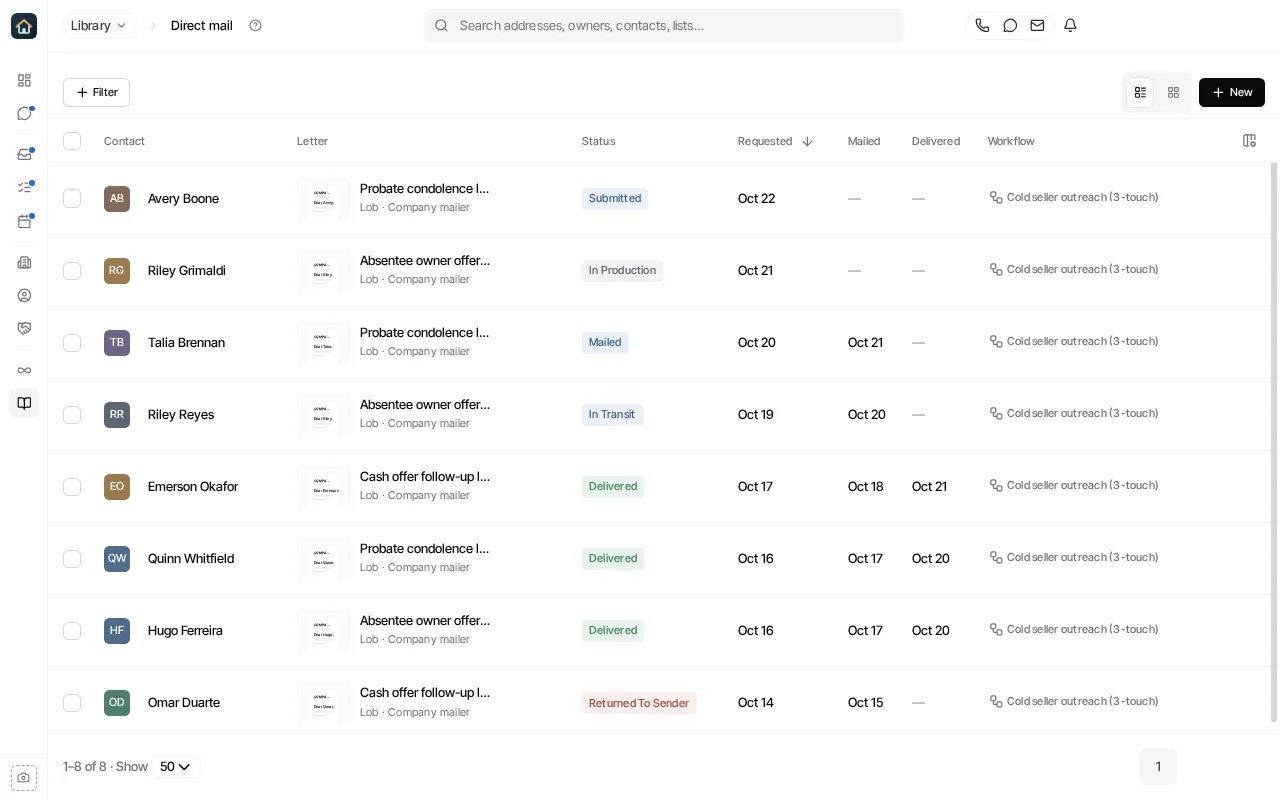
A letter appears here once a workflow’s Send physical mail step prepares one. Each row shows:
- Contact and Letter: who it went to, the template, and the provider account that sent it.
- Status: for example Submitted, In production, Mailed, In transit, Delivered or Returned to sender. Your mail provider reports each change.
- Requested, Mailed and Delivered: when each happened.
- Workflow: the workflow that sent it. Select it to open the workflow.
Use Filter to narrow the list. Select a letter to open its own page with its tracking. The same letters also show on each contact’s timeline.
Start a mail campaign
Section titled “Start a mail campaign”Select New letter (or New → Direct mail campaign on the Library home page) and tell Goliath what the letter should say and who should get it. Goliath sets up the mailing and the workflow that sends it.
Mail is sent through your own Lob, PostGrid or Open Letter Connect account, which an organization admin connects first. See Send physical mail.
Ask Goliath Reading: Direct mail